The Story of Why Osu! Lazer Couldn’t Start Due to a Certain NVIDIA Feature
Osu! Lazer
I recently decided to play Osu! again after a long time, prompted by something specific, but for some reason, the application wouldn’t launch. It crashed immediately after startup without even opening the Osu! screen (sweat).
I tried downloading the latest data and performing an overwrite installation and update, but it didn’t fix the issue… I wondered if an update I hadn’t noticed caused a compatibility problem with a beatmap or skin, but that didn’t feel quite right either.
I checked the application’s data location and looked at the logs, but there were no crash logs, and I was at a loss.
Then I thought, “Wait, I might not have launched it since I replaced my GPU?"
Investigating from a graphics perspective, I discovered that a certain NVIDIA feature was the culprit, so I’d like to share this information!
Smooth Motion
The “Smooth Motion" feature available with NVIDIA’s RTX 40 and 50 series GPUs was causing the problem.
This feature uses AI to double the FPS, which generally benefits most games. However, it seems to have terrible compatibility with software like Osu!, which is very strict about FPS and latency.
Since I usually play FPS games, I intentionally keep Smooth Motion off even in games like Apex.
For now, I will configure the settings to keep Smooth Motion on by default but disable it when Osu! is running.
Settings
First, assuming the NVIDIA App is installed, launch the app and make changes in the order shown in the image below.
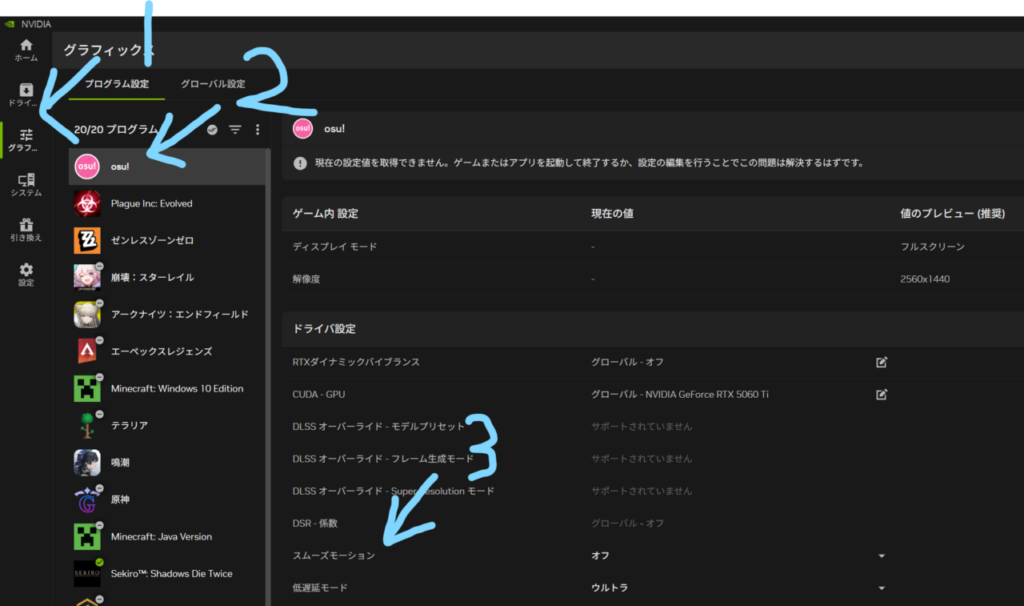
After launching the app, select Osu! from the graphics tab on the left, and then turn off the Smooth Motion section within the driver settings. This completes the setup!
If it still doesn’t launch, I also recommend running the repair button that appears when you launch the Osu! installer again!
That’s all!